
Simpay.pl – why is it a good solution for e-commerce entrepreneurs?
In the digital market, the most important aspects are speed, convenience, and transaction security. Sometimes, users of certain websites are reluctant to create special accounts or fill out complicated forms. They want to click, pay, and get access. This is where Simpay.pl stands out as a solution that combines these three elements, offering entrepreneurs and creators tools to support a variety of payment methods, from Premium SMS, BLIK payments, and transfers, to Direct Billing and payment cards.
What is simpay.pl?
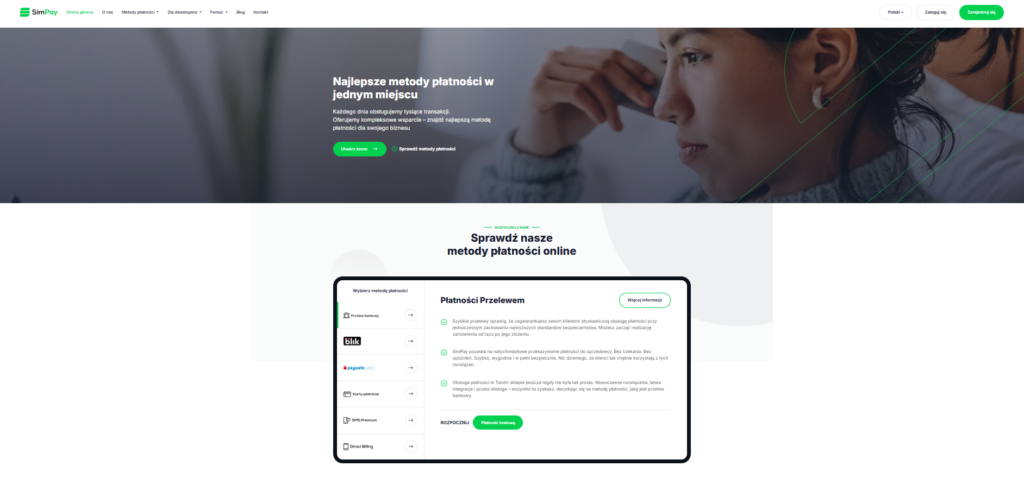
Simpay.pl is an online payment platform for online stores, digital services, and service providers who want to make it easier for customers to pay for goods or services. Every day, the system handles thousands of transactions and offers businesses solutions tailored to different sales models.

Various payment methods offered by Simpay
One of the biggest advantages of Simpay.pl is that it does not limit you to a single payment method. In practice, this means that users can tailor the payment method to their customers – and not the other way around. Everyone pays in the way that is most convenient for them. The available payment methods are:
Direct Billing
Here, the fee goes directly to the phone bill or is deducted from a prepaid account. This solution works well for subscriptions and content access. It is best used when the user mainly uses their phone.Premium SMS payments
This option still works well for digital content and micropayments. The customer sends an SMS, receives a code, and has access to the product in a few seconds. No card details, no bank login. Simple and fast.BLIK and quick transfers
The standard in Polish e-commerce. This payment method is now widely known and available at every bank. Entering a BLIK code or quickly approving a transfer in a banking app is now the most natural form of payment for many people. The transaction takes a moment and is confirmed immediately.Payment cards and PaySafeCard
A classic that still has a strong position. Cards are universal and recognizable, and PaySafeCard allows you to pay without revealing your bank details.Integrating your business with Simpay is incredibly easy!
The process of starting cooperation with Simpay.pl is described step by step on the website:
Account registration – the entrepreneur creates an account in the system and activates it by paying a symbolic refundable fee (PLN 1).
Integration with the store system – after activation, you add your store to the platform and use technical documentation, plugins, or API to connect the selected payment methods.
Active payment acceptance – funds from sales go directly to the seller’s account, and the system automates transaction processing.
Support for many popular e-commerce platforms (including WooCommerce, PrestaShop, and Magento) facilitates quick implementation of the system even without advanced technical knowledge.
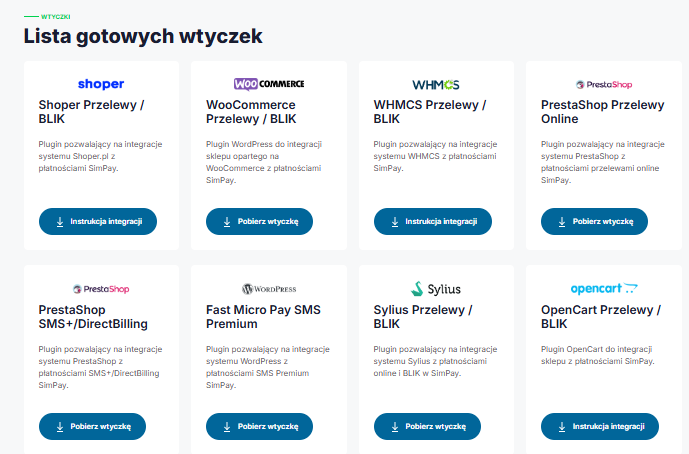
The website offers a list of ready-made plugins.
If you run an online store or create sales platforms and want your payments to work smoothly from day one, Simpay.pl has a specific solution for you. You don’t have to start programming everything from scratch – Simpay provides ready-made plugins and modules that allow you to instantly connect various payment methods to popular e-commerce systems such as WooCommerce, PrestaShop, OpenCart, WHMCS, and Shoper. This means that even if your store is not yet a “technological powerhouse,” you can offer your customers online transfers, BLIK payments, Premium SMS, or Direct Billing almost immediately. And if you use your own solution or want to integrate the system more deeply, Simpay gives you access to API documentation and libraries in multiple programming languages, making it easy to tailor payments exactly to your needs. The implementation process itself is simple and flexible.
Why should you use Simpay?
• Wide range of payment methods – includes both modern solutions such as BLIK and bank transfers, as well as traditional forms of payment.
• Technical security – connections encrypted with a 256-bit key ensure data and transaction protection.
• Intuitive customer panel – the dashboard allows you to track your transaction history and easily manage your payments.
• Local character – Simpay is a Polish company, and its support team also communicates in Polish.
StreamPay.pl – a simple way for creators to monetize their content
More and more streamers confirm that donations from viewers can constitute a large part of their monthly income, especially if the channel does not yet have thousands of subscribers or sponsors. According to data from streamer market analyses, even small channels can generate from several dozen to several hundred dollars a month from viewer donations and bits alone — while traditional advertising revenue often does not exceed several dozen dollars for a similar number of viewers.
What is StreamPay.pl?
StreamPay.pl is a platform that allows creators to accept payments from viewers in the form of donations. The solution was designed for streamers, YouTubers, and people building a community around their content. The system allows you to easily generate your own payment link, which can be placed under the broadcast, in the video description, or on social media.
Who will StreamPay be a good solution for?
The platform will work particularly well for:
gaming streamers,
YouTube and Kick creators,
influencers building a community,
people who do not yet have monetization from advertising,
creators who want to become independent from algorithms.
If your community is engaged, even small, regular donations can become a stable source of income.How does Stream Pay work?
The website is very simple and intuitive to use:
You register an account.
You configure your profile and payment settings.
You receive a personalized donation link.
You add it to your stream or bio.
You receive payments from viewers.
Additionally, you can integrate the system with OBS or other streaming software so that payment notifications appear directly on the stream.The website offers a proprietary preview panel
One of the practical elements of the platform is a proprietary preview panel that allows creators to control all the most important information about payments in one place. From the dashboard, you can check your transaction history, current balance, support statistics, and viewer activity on an ongoing basis. The panel has been designed to be clear and intuitive, without being overloaded with unnecessary features. This allows even novice streamers to quickly find their way around the system and focus on creating content instead of analyzing complex reports. It is a tool that makes monetization management easier and gives you full control over the flow of funds.
Competitive commissions
Depending on the payment method selected, StreamPay commissions vary slightly: most options, such as BLIK, online transfer, or “Pay later,” offer a 97.11% commission for the user with a minimum fee of PLN 0.1, while PaysafeCard provides an 84% commission with a minimum amount of PLN 0.15. The most advantageous in terms of commission are SMS+ and PayPal, which offer a full 100% commission with no minimum fees, while Skrill and Kinguin pay 92% and 88% commission, respectively, with Skrill requiring a minimum fee of PLN 10. The entire list shows transparent rules for calculating remuneration, allowing you to choose the most profitable payment method.

How do you protect your home WiFi Network?
If we went back a nice few years, we would see our home wireless networks that were quite simple. One connection point and one, up to two computers connected to it. But in recent years, home WiFi has become increasingly important to us. Today we connect a lot of different devices to it. From smartphones and tablets to televisions or even temperature controllers. And imagination can suggest much more equipment. Therefore, it is even more important to properly secure your home WiFi network. Let’s look at how to do it.
WiFi, or what?
Even if there are still people among us who connect to the network using a cable, we most often use wireless connections, i.e. WiFi. It is a much more practical solution than using the entire “spider web” of cable connections.
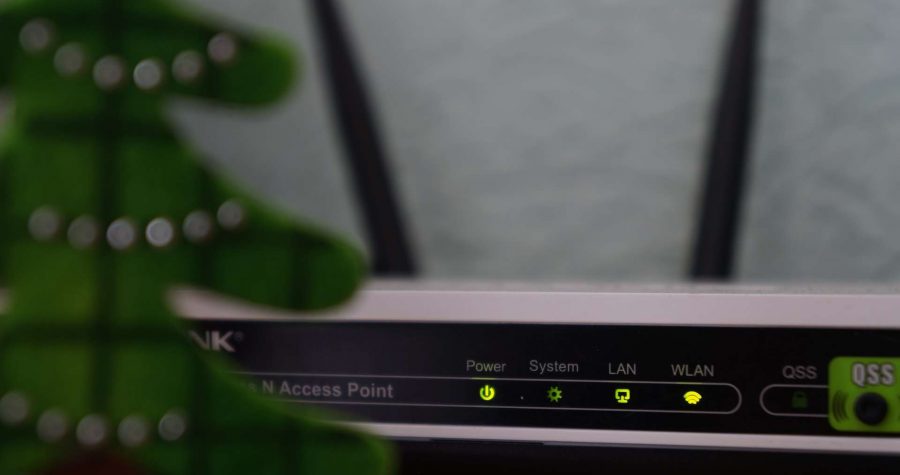
As a rule, your home network is governed by a router. It can be a device with a built-in modem received from an Internet service provider or a separate router that you purchased, which is later connected to the modem. Regardless of what solution you use, the network works in the same way, i.e. via wireless signal sending. Your devices connect to the wireless network and thus you can access the internet in them.
SECURITY IN THE NETWORK
It is extremely important to do it safely. Much more is said about security in public, open WiFi networks, where sending important information involves a very high risk. Nobody wants his passwords to get into the wrong hands, for example, for e-mail, social networking, and even more so banking services. Hence, experts recommend using security in public networks to protect your information, such as VPNs. This is called “virtual private network”, that is, real protection of our data sent when connecting to individual pages. The VPN encrypts them and prevents anyone who should not have access to them. In a public wireless network, sending your vital information without any security is a bit like leaving the house and leaving the door open. We can count on the fact that nobody will take the opportunity, but it’s better to close the door. On the Internet, VPN “closes the door” and it has two locks that are very difficult to cross.
HOW TO PROTECT YOUR HOME WIFI
But danger is waiting for our important data not only in public networks. We often forget to additionally protect them also in our own home network, where also as a “protective shield” VPN will be perfect. In this case, it is an additional level of protection in addition to the password we use to secure the network. In addition to using a VPN, there are many other options for protecting your home WiFi network. Here they are:
1. CHANGE NETWORK PASSWORD
You can configure your network settings through an administrator account. Make sure you change the WiFi password in it. Routers and modems are often supplied with a very weak password that is easy to “crack”. Therefore, they should be changed as soon as possible after receiving the device to a unique, strong password that will securely access the network.
2. CHOOSE A “STRONG” PASSWORD
“Strong” in this case means one that is difficult to break. There are a few basic rules for creating passwords that apply to all places on the internet. Use rather long passwords with a variety of characters (lowercase, uppercase, numbers, special characters), avoid names (own, children, husband, wife, etc.) and common words. One of the basic rules of network security says that passwords should be changed regularly and this applies not only to WiFi.
3. ACTIVATE NETWORK ENCRYPTION THROUGH WPA2
When setting up your home network, be sure to activate WPA2 encryption protocol. This is a guarantee that your connections will be encrypted and that no outsiders will be able to use them. Active WPA2 means that anyone who wants to connect to your network must know the password for it.
4. CHANGE THE NETWORK NAME
Each network has a standard name set, so-called SSID. This is the name that the device searches for when connecting to WiFi. Make sure that it does not disclose any personal data that may be useful to someone conducting a possible Internet attack.
5. CONFIGURE THE GUEST NETWORK
By setting up a guest network, you will allow your home visitors to use a WiFi connection, but without access to devices connected to your main network. Just like in the case of the basic network, the guest network should have its name, WPA2 encryption and a separate password.
6. DISABLE THE POSSIBILITY OF CONNECTING THROUGH WPS
WPS is the ability to connect to the network without having to enter a password or configure the connection. For safety it’s better to turn it off. The WPS start and stop button is usually located on the router.
TAKE CARE OF THE DEVICES
In addition, remember that not only the network must be completely secure, but also the devices that connect to it. It is known that every chain is as strong as its weakest link. So remember the basic safety rules when using your devices:
- always update the operating system, browser and all software, because in new versions their producers contain solutions to previously emerging security holes
- choose unique, strong passwords, exactly according to the same rules as for networks
- remember to have different passwords on different devices
- avoid clicking on suspicious links and opening attachments from unknown sources, use antivirus programs that protect your devices against known viruses
These are basic tips that will make your Internet connection in a wireless home network safer. It is worth using all the simple solutions available on the network or on devices, and additionally secure your data using VPN connections, which will guarantee us security reliably.

Browser schneller als Chrome, blockiert Werbung automatisch – Brave Browser
Brave Browser ist ein moderner und kostenloser Webbrowser, der sicher ist, Werbeanzeigen blockiert und schneller ist als Chrome. Wie das möglich ist?
Gibt es einen schnelleren Browser als Chrome? Was ist der schnellste Browser? Die Antwort auf alle Fragen ist der Brave Browser, der ein chrombasierter Browser ist (es ist der gleiche Motor mit dem Google Chrome arbeitet), so dass die Seiten so schnell wie in Chrome geladen werden. Jedoch, hat Brave zusätzliche Vorteile, durch das automatische Entfernen von Werbenzeigen und Tracking-Skripten laden die Seiten in diesem Browser schneller und Brave schützt Ihre Privatsphäre.
WO KANN MAN BRAVE HERUNTERLADEN?
Brave kann von der offiziellen Website heruntergeladen werden – hier klicken zum Herunterladen. Der Browser ist für nahezu alle gängigen Betriebssysteme verfügbar: Windows, Android, IOS, Linux, Mac OS. Es ist erwähnenswert, dass Brave Browser völlig kostenlos ist.

WARUM BRAVE?
- Brave lädt Seiten viel schneller als Chrome, Opera, Firefox, etc.
- Es hat einen eingebauten Torrent-Netzwerk-Client.
- Es verfügt über ein integriertes AD-Blocker-Plug-in und Pop-up Blocker
- Es verfügt über einen integrierten Mechanismus zum Blockieren von Skripten und Cookies zum Nachverfolgen von Benutzern
- Hat die Möglichkeit des integrierten Gleisnetzes im Inkognito-Modus
- Ermöglicht Geld zu verdienen durch anschauen von Werbeanzeigen (derzeit ist die Funktion nur u.a. in Deutschland enthalten, in Polen noch nicht)
- Synchronisation (Beta-Version), die die Möglichkeit ist, Daten einfach zwischen Geräten zu übertragen
- Leitet den Datenverkehr automatisch an das sichere SSL-verschlüsselte Protokoll um


How to save money at a young age? Ways to collect the necessary cash!
There are many ways to save. Young people value financial independence, which is why they also expect a lot from a potential employer during job interviews. There is no way to get the lowest national. If we live in a smaller city and are unable to find a well-paid job, then how can we save extra money for the future?
CHANGE OF SETTING DURING ELIGIBILITY CALLS
Young people deciding to start a new job pick up the best offers available on the market. Each of us wants to work in a reputable company, where they can get a decent payment, from which they can save some savings for the future. A good, stable job is the first of the ways we can get extra cash. Some companies also offer their employees additional bonuses for completing specific plans, or money vouchers for well-done work and loyalty. There are many opportunities to get extra cash. Fortunately, we don’t have to look far.
ADJUSTMENT OF ACCOUNTS IS ONE OF THE WAYS TO SAVE MONEY
If we have unpaid bills, because we took out a loan or took, for example, home electronics and household appliances in installments in a computer hardware store, we may encounter additional costs and commissions. It is worth settling all arrears within the prescribed period, which can be found without any problems on the signed contract. Often, however, we forget about small expenses, but the lack of repayment on time can cause that they will become quite high and it will be difficult for us to regulate them. Moreover, if we are dealing with financial institutions, we can expect high interest rates. Non-bank companies and the bank enter debtors’ data into the databases of indebted persons. As a result of entering into the Credit Information Bureau, Economic Information Bureau or the National Debt Register in the future, you may be denied another loan or credit. Let us remember that we can never predict when we will really need to incur additional cash. Loans can be obtained for any purpose, which is a big plus for young people.
OPEN A SAVING ACCOUNT
Another interesting solution to save extra money is to set up a savings account or a bank deposit. It is worth searching all offers and choosing the one best suited to our needs and possibilities. If the savings account has a high interest rate, we can count on the flow of more cash. Having a savings account does not require high fees. The regularity of transferring money to a bank account is important. It is also difficult to choose money from your account. Sometimes this requires you to be at the nearest bank branch, making it more likely that your money will be unaffected.
DO SHOPPING WITH A LIST!
A good way to save money is to go shopping with a previously prepared list of things we need to buy for our apartment. It is important to think about what we really lack and buy only those things that we wrote on the paper. Otherwise, a common case is senseless circulation around the store and choosing products that are certainly not so necessary in our everyday lives. This rule applies, for example, to food, home accessories or clothing. Pay attention to the food basket. We often overpay when shopping for food, where, unfortunately, it ends up in throwing most of the food into the bin. We also take care of our environment thanks to thoughtful purchases.
RESTRICT FOOD IN THE CITY
If we are interested in saving extra money, we may consider limiting the spending of cash on meals consumed in restaurants. When preparing dinners at home, we can save a lot of cash. Of course, it’s worth to go out from time to time with friends or family and eat dinner together.
ECONOMIC DRIVING
If you have a driving license and use a car every day, you should switch to economical driving. You can also arrange a trip to work with your friends. In addition, pay attention whether you are parking in an allowed place. The fines are the last thing that can lead us to save extra cash. On warm days, instead of getting in the car, it’s worth thinking about coming to work by bike. Of course, if we live relatively close to our office. You can also think about public transport. Public transport is relatively cheap, which allows us to save extra cash.
USE INTERNET COMPARISON
Verifying product prices in various online stores has become quite popular nowadays. We can easily do it via comparison websites. We are able to check the prices of both financial and non-financial products. By finding a cheap product, we can save from a few to several dollars. Also comparison websites help us find a product suited to our needs. We are able to find, in one place, the opinions of former customers, i.e. people who had the opportunity to test or try the product. In addition, we also see opinions about a given brand. And as you know, if a company has a reputation, it is more eagerly chosen by customers.
Browser faster than chrome, automatically blocking advertisements – Brave Browser
Brave Browser is a modern and free web browser that is secure, blocks advertising and is faster than chrome. How is it possible?
Is there a faster browser than chrome? What is the fastest browser? The answer to all your questions is Brave Browser, which is a chromium-based browser (so it’s the same engine that Google Chrome works with), so the pages load as fast as the chrome. However, brave has additional advantages – by automatically removing ads and tracking scripts, the sites in this browser load faster and most importantly, no one follows us, so we gain more privacy.
Where to download Brave from?
Brave can be downloaded from the official website – click here to download. The browser is available on virtually all commonly available operating systems: Windows, Android, IOS, Linux, Mac OS. It is worth mentioning that Brave Browser is fully free of charge.
Why Brave?
- Brave loads pages much faster than Chrome, Opera, Firefox, etc.
- It has a built-in torrent network client
- Includes a built-in plug to block advertising and pop-up windows
- It has a built-in mechanism to block scripts and cookies for tracking users
- It has a built-in track network option in incognito mode
- Enables you to earn money by watching ads on websites
- Synchronization (Beta version), i.e. the ability to easily transfer data between devices
- Automatically redirects traffic to a secure SSL encrypted protoco
Source 2 and 128-tick servers may appear on May 18 in CS GO!
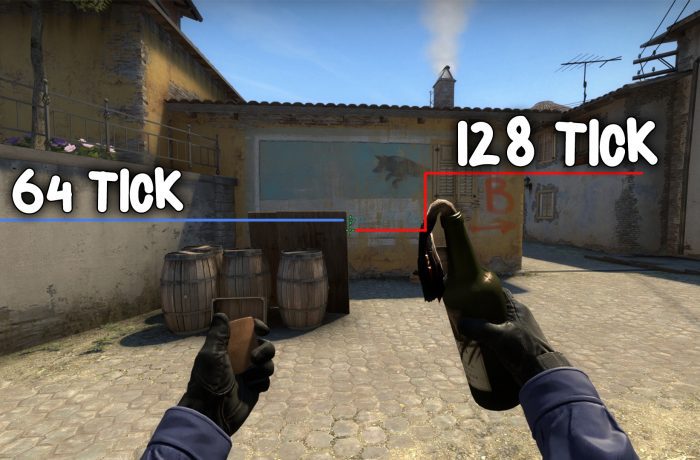
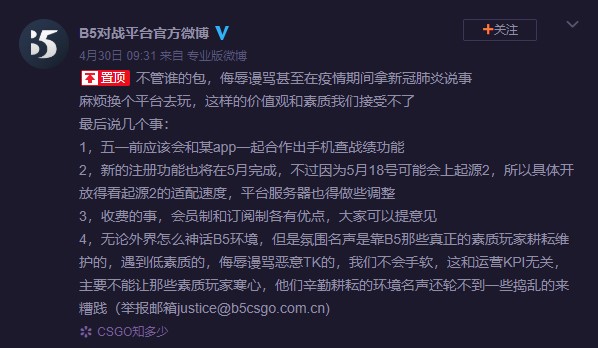
The CS:GO community has long been awaiting an update that will introduce Source 2, the new Valve engine and 128 tickrate server. According to information received by reddito users, a note about Source 2 appeared on weibo.
Source 2 CSGO
Weibo is a Chinese microblogging site, is one of the largest social media platforms in China. The official profile of the B5 platform (something like faceit in China) published information about the new registration in May, but after May 18, as Source 2 will probably appear then.
New registration function will also finish by May, however due to Source 2 probably coming up on May 18th, so everything is up to the pace of the release of Source 2 update, battle platform server will also need to adjust as well
CSGO update
Files related to the new Source 2 engine in the game have been appearing for a long time and not only in CSGO. In one of the updates in Dota (which already has a Source 2 engine) in February there was an entry:
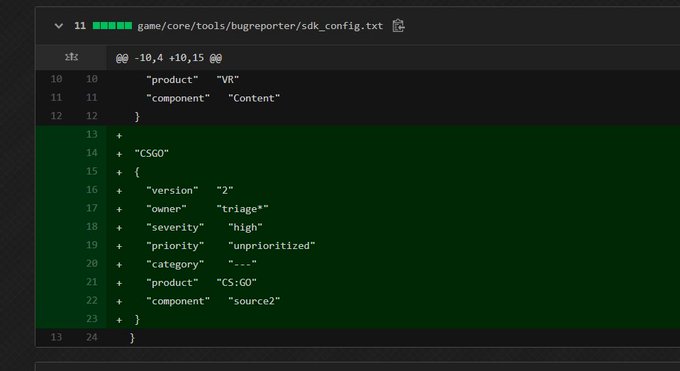
Source 2 is getting closer and we can expect this update anytime soon! It is not known whether game mechanics and textures will change. Source 2 will probably only be available in the beta for a long time.
Bind to clean blood in CS:GO
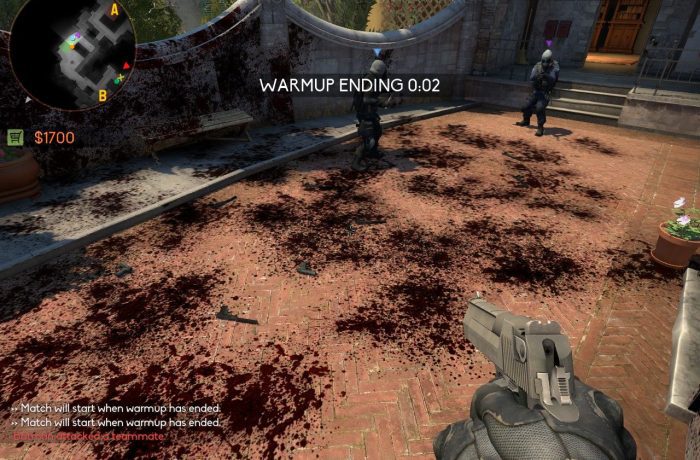
You’ve probably had so many times that blood or bullet marks obstructed your enemy or confused FPS and general visibility on the map. In this guide, I will show you the command to clean blood and bullets, and examples of binds that you can use in the game. Check how you can clear decals csgo.
Command to remove blood and bullet marks
The command to clean the blood is: r_cleardecals, just type it in the console to remove blood from the map.
Bind for blood cleaning
The first bind that removes blood when you press shift or ctrl:
bind "shift" "+ speed; r_cleardecals;" bind "Ctrl" "+ duck; r_cleardecals;"
Clear blood csgo
This bind allows you to clean the map when reloading weapons:
bind "R" "+ reload; r_cleardecals"
CSGO clear decals Bind can be entered in the console, in the startup settings, or in our configuration file (cfg).
Commands for more FPS in CS:GO in 2020!
In this guide, I will introduce you to all commands for more fps in CSGO in 2020. How to make more FPS in CS GO? There are plenty of options, it is worth starting by reducing the graphics settings in the game. Later, we can use the start parameters: Basic start parameters in CS:GO. Below are all ways to increase FPS in CS:GO.
Game settings
Reduce the graphics settings in the game, the main role is played by textures, shadows and resolution. The lower the resolution, the more FPS in CS:GO.
Enter the appropriate startup commands given in this guide: Basic startup parameters in CS:GO.
It is also worth taking a look here if you have a Nvidia card: How to set Nvidia drivers for more FPS in games ?.
Remember that FPS depends on your equipment, it cannot be doubled only by commands. The commands will allow you to reduce lag on your computer and thus increase the FPS by several percent.
Embrace your computer
Try to clean unnecessary files and increase free disk space. You can also scan your computer with an anti-virus and, for example, the ADWCleaner tool, which removes unwanted “worms,” or programs that display unwanted ads. It is also worth mentioning about physically cleaning parts of the computer. Dust in the housing causes an increased temperature, so components may not work at full power. Replacing the thermal grease and cleaning the fans of dust will not hurt and will always help.
Useful sv_cheats 1 commands in CS: GO!
You’ve probably heard about the magical sv_cheats 1 command, which allows you to run e.g. wh in CS: GO. In this guide I will introduce you to most of the sv_cheats commands, which are useful for playing with friends or training aima.
Useful sv_cheats commands
Remember that you can enter the sv_cheats 1 command only on the local server or on the private server where you have access to rcon. Just start the training server with bots.
Wallhack Command CSGO
Wallhack means that you can see other players through the walls. There are several commands that enable this option:
r_drawothermodels 2 – Basic and best known command on WH in CSGO. The default value is 1 (no wh). It can be 0, 1 or 2.
enable_skeleton_draw 1 – This will render all players ‘skeleton’, giving you the opportunity to see ‘skeletons’ through the walls. The default value is 0. It can be 0 or 1.
mat_wireframe 2 – works very much like the first command. The difference is that this command renders more details of the player’s skeleton. The default value is 0. It can be 0, 1, 2, 3 or 4.
mat_proxy 2 – This is more like a traditional wallhack. You’ll be able to see players through some walls and objects, but your screen will sometimes be very bright, so it’s not so useful. The default value is 0. It can be 0, 1, 2 or 3.

Commands for flying and immortality in CSGO
These commands work like the classic codes that can be found in a computer game. It gives you invincibility, infinite ammo and the ability to move around objects.
god – “god” mode. It gives you immortality. Re-type to disable it.
sv_infinite_ammo 1 – Gives you infinite ammo for all your weapons. The default value is 0. It can be 0, 1 or 2, which will give you different degrees of infinite ammunition.
0: no infinite ammo
1: infinite ammo with infinite magazine size (no need to reload)
2: unlimited ammo, but limited magazine size (need to reload)
noclip – The mode of flying and moving on the walls. Re-type to disable.
thirdperson – Typing a third person in the console menu will change the view from first person to third. To return to the first-person view, enter “firstperson” in the console.
r_drawparticles 0 – Cheat / “no smoke” command. Using this command will hide particles, including smoke from smoke grenades, unless you are standing directly in the smoke.
The default value is 1. It can be 0 or 1.
fog_override 1 – “no fog” command. When you zoom in on a sniper rifle, the image will be a little hazy. When this command is active, you will have a clear image even when zoomed in. After using fog_override 1, you should use fog_enable 0 to completely turn off fog.
fog_enable 0 – Disable fog – see previous command. The default value is 1. It can be 0 or 1.
fogui – This will open an interactive user interface (UI) that you can play with fog settings. You can reduce and increase the fog, and even change the color of the fog.
host_timescale [value] – “speedhack” command replace [value] with any value. This will not only speed up you, but will change the speed / time scale of the entire server, making everyone look super fast or slow. The default is 0. Higher values will make you move faster, and lower values will make you move more slowly. Example values Acceleration: host_timescale 5 Slow motion: host_timescale 0.5
host_framerate [value] – Another speedhack command, replace [value] with any value. This works by blocking frames per second, which in turn will make the game accelerate / bloom. The default value is 0 (disabled). If you set host_framerate to 500, you will see that your in-game FPS counter is locked to 500 FPS, while you don’t really get 500 FPS, your game moves will be slower. Higher values = slower. Lower values = faster. Example Speedhack values: host_framerate 50 Slow motion: host_framerate 500
sv_consistency 0 – Bypass consistency. This command enables / disables whether the server enforces file consistency for critical files. The default value is 0.
sv_showimpacts 1 – Shows all arrows, bullet and grenade paths. The default value is 0. It can be 0 or 1.
cl_pitchup 900 – Unlock maximum crosshair. 900 can be replaced with any value. This is the amount you can move up. If you set it to 900, you can move up as much as you like until you turn around and you are upside down. The default value is 89.
cl_pitchdown 900 – Unlock maximum crosshair. Opposite cl_pitchup. The default value is 89.
snd_show 1
snd_visualize 1: ESP sound commands. Displays various information about the sounds in the game. The default value is 0.
cl_leveloverview 2 – This command will show the entire map in advance. However, this command can sometimes be incorrect and sometimes works. The default value is 0. The values can be 0, 1 or 2.
CSGO rendering commands
mat_fullbright 3 – Fullbright command. At the highest value, the walls and models will be smooth and bright. The default value is 0. It can be 0, 1, 2 or 3.
mat_fillrate 1 – This is a “no flash” command, sometimes called “Asus wallhack”. When this option is on, the screen will not be brightened when it is flashed by a flash grenade. The default value is 0 (off). It can be 0 or 1.
r_showenvcubemap 1 – When this command is enabled, all models and weapons will look like they have a chrome finish. The default value is 0. It can be 0 or 1.
mat_showlowresimage 1 – Minecraft mode. This command will enable extremely low resolution, making the walls and surroundings look like Minecraft. The default value is 0. It can be 0 or 1.
The command to throw the knife: mp_drop_knife_enable 1. The default value is 0 (knife throwing disabled).
Source 2 and 128-tick servers may appear on May 18 in CS GO!
The CS:GO community has long been awaiting an update that will introduce Source 2, the new Valve engine and 128 tickrate server. According to information received by reddito users, a note about Source 2 appeared on weibo.
Source 2 CSGO
Weibo is a Chinese microblogging site, is one of the largest social media platforms in China. The official profile of the B5 platform (something like faceit in China) published information about the new registration in May, but after May 18, as Source 2 will probably appear then.
New registration function will also finish by May, however due to Source 2 probably coming up on May 18th, so everything is up to the pace of the release of Source 2 update, battle platform server will also need to adjust as well
CSGO update
Files related to the new Source 2 engine in the game have been appearing for a long time and not only in CSGO. In one of the updates in Dota (which already has a Source 2 engine) in February there was an entry:
Source 2 is getting closer and we can expect this update anytime soon! It is not known whether game mechanics and textures will change. Source 2 will probably only be available in the beta for a long time.
Bind to clean blood in CS:GO
You’ve probably had so many times that blood or bullet marks obstructed your enemy or confused FPS and general visibility on the map. In this guide, I will show you the command to clean blood and bullets, and examples of binds that you can use in the game. Check how you can clear decals csgo.
Command to remove blood and bullet marks
The command to clean the blood is: r_cleardecals, just type it in the console to remove blood from the map.
Bind for blood cleaning
The first bind that removes blood when you press shift or ctrl:
bind "shift" "+ speed; r_cleardecals;" bind "Ctrl" "+ duck; r_cleardecals;"
Clear blood csgo
This bind allows you to clean the map when reloading weapons:
bind "R" "+ reload; r_cleardecals"
CSGO clear decals Bind can be entered in the console, in the startup settings, or in our configuration file (cfg).
Commands for more FPS in CS:GO in 2020!
In this guide, I will introduce you to all commands for more fps in CSGO in 2020. How to make more FPS in CS GO? There are plenty of options, it is worth starting by reducing the graphics settings in the game. Later, we can use the start parameters: Basic start parameters in CS:GO. Below are all ways to increase FPS in CS:GO.
Game settings
Reduce the graphics settings in the game, the main role is played by textures, shadows and resolution. The lower the resolution, the more FPS in CS:GO.
Enter the appropriate startup commands given in this guide: Basic startup parameters in CS:GO.
It is also worth taking a look here if you have a Nvidia card: How to set Nvidia drivers for more FPS in games ?.
Remember that FPS depends on your equipment, it cannot be doubled only by commands. The commands will allow you to reduce lag on your computer and thus increase the FPS by several percent.
Embrace your computer
Try to clean unnecessary files and increase free disk space. You can also scan your computer with an anti-virus and, for example, the ADWCleaner tool, which removes unwanted “worms,” or programs that display unwanted ads. It is also worth mentioning about physically cleaning parts of the computer. Dust in the housing causes an increased temperature, so components may not work at full power. Replacing the thermal grease and cleaning the fans of dust will not hurt and will always help.
Useful sv_cheats 1 commands in CS: GO!
You’ve probably heard about the magical sv_cheats 1 command, which allows you to run e.g. wh in CS: GO. In this guide I will introduce you to most of the sv_cheats commands, which are useful for playing with friends or training aima.
Useful sv_cheats commands
Remember that you can enter the sv_cheats 1 command only on the local server or on the private server where you have access to rcon. Just start the training server with bots.
Wallhack Command CSGO
Wallhack means that you can see other players through the walls. There are several commands that enable this option:
r_drawothermodels 2 – Basic and best known command on WH in CSGO. The default value is 1 (no wh). It can be 0, 1 or 2.
enable_skeleton_draw 1 – This will render all players ‘skeleton’, giving you the opportunity to see ‘skeletons’ through the walls. The default value is 0. It can be 0 or 1.
mat_wireframe 2 – works very much like the first command. The difference is that this command renders more details of the player’s skeleton. The default value is 0. It can be 0, 1, 2, 3 or 4.
mat_proxy 2 – This is more like a traditional wallhack. You’ll be able to see players through some walls and objects, but your screen will sometimes be very bright, so it’s not so useful. The default value is 0. It can be 0, 1, 2 or 3.
Commands for flying and immortality in CSGO
These commands work like the classic codes that can be found in a computer game. It gives you invincibility, infinite ammo and the ability to move around objects.
god – “god” mode. It gives you immortality. Re-type to disable it.
sv_infinite_ammo 1 – Gives you infinite ammo for all your weapons. The default value is 0. It can be 0, 1 or 2, which will give you different degrees of infinite ammunition.
0: no infinite ammo
1: infinite ammo with infinite magazine size (no need to reload)
2: unlimited ammo, but limited magazine size (need to reload)
noclip – The mode of flying and moving on the walls. Re-type to disable.
thirdperson – Typing a third person in the console menu will change the view from first person to third. To return to the first-person view, enter “firstperson” in the console.
r_drawparticles 0 – Cheat / “no smoke” command. Using this command will hide particles, including smoke from smoke grenades, unless you are standing directly in the smoke.
The default value is 1. It can be 0 or 1.
fog_override 1 – “no fog” command. When you zoom in on a sniper rifle, the image will be a little hazy. When this command is active, you will have a clear image even when zoomed in. After using fog_override 1, you should use fog_enable 0 to completely turn off fog.
fog_enable 0 – Disable fog – see previous command. The default value is 1. It can be 0 or 1.
fogui – This will open an interactive user interface (UI) that you can play with fog settings. You can reduce and increase the fog, and even change the color of the fog.
host_timescale [value] – “speedhack” command replace [value] with any value. This will not only speed up you, but will change the speed / time scale of the entire server, making everyone look super fast or slow. The default is 0. Higher values will make you move faster, and lower values will make you move more slowly. Example values Acceleration: host_timescale 5 Slow motion: host_timescale 0.5
host_framerate [value] – Another speedhack command, replace [value] with any value. This works by blocking frames per second, which in turn will make the game accelerate / bloom. The default value is 0 (disabled). If you set host_framerate to 500, you will see that your in-game FPS counter is locked to 500 FPS, while you don’t really get 500 FPS, your game moves will be slower. Higher values = slower. Lower values = faster. Example Speedhack values: host_framerate 50 Slow motion: host_framerate 500
sv_consistency 0 – Bypass consistency. This command enables / disables whether the server enforces file consistency for critical files. The default value is 0.
sv_showimpacts 1 – Shows all arrows, bullet and grenade paths. The default value is 0. It can be 0 or 1.
cl_pitchup 900 – Unlock maximum crosshair. 900 can be replaced with any value. This is the amount you can move up. If you set it to 900, you can move up as much as you like until you turn around and you are upside down. The default value is 89.
cl_pitchdown 900 – Unlock maximum crosshair. Opposite cl_pitchup. The default value is 89.
snd_show 1
snd_visualize 1: ESP sound commands. Displays various information about the sounds in the game. The default value is 0.
cl_leveloverview 2 – This command will show the entire map in advance. However, this command can sometimes be incorrect and sometimes works. The default value is 0. The values can be 0, 1 or 2.
CSGO rendering commands
mat_fullbright 3 – Fullbright command. At the highest value, the walls and models will be smooth and bright. The default value is 0. It can be 0, 1, 2 or 3.
mat_fillrate 1 – This is a “no flash” command, sometimes called “Asus wallhack”. When this option is on, the screen will not be brightened when it is flashed by a flash grenade. The default value is 0 (off). It can be 0 or 1.
r_showenvcubemap 1 – When this command is enabled, all models and weapons will look like they have a chrome finish. The default value is 0. It can be 0 or 1.
mat_showlowresimage 1 – Minecraft mode. This command will enable extremely low resolution, making the walls and surroundings look like Minecraft. The default value is 0. It can be 0 or 1.
The command to throw the knife: mp_drop_knife_enable 1. The default value is 0 (knife throwing disabled).